
For people who run more than one coding agent
Five terminal tabs. Two browser tabs.

So, what were we doing here?
Multitask your coding agents without losing your mind.

A multi-terminal desktop app: one native terminal per agent, side by side, each pane's state read off the CLI itself, each conversation readable without scrollback.

Windows 10 1809+ / 11 · one ConPTY per pane · Claude Code, any shell, SSH · status from the CLI's own hook events, not screen scraping · local SQLite · no account · no telemetry · reading view: deterministic, no model in the loop · free · closed source

You know this one

Running five agents is easy.
Remembering what each one was doing is the part that hurts.

Each one works fine on its own. Together they fragment you: every switch costs a re-read, and the questions you meant to ask go missing.

Click back into a tab after an hour: what was this one doing, and what did I ask it?
your prompts and its answers, on one page →
Five agents, five half-remembered plans. Which one had the migration?
every conversation on one screen, with its state →
Re-reading 300 lines of scrollback to find the question you asked an hour ago.
tool chatter folded, prompts stand out →
You switch to the other one and lose the thread of this one.
ask about it on the side →
A 90-line answer in a terminal font is a chore to read, so you skim it and miss the question.
your type, your spacing →
Alt-tab, alt-tab, alt-tab. Wrong window. Alt-tab.
all of them in one window →
You step away for coffee and forget which agent was working on what.
the list, with states, on your phone →
An agent sat on a y/n prompt for 20 minutes. Nobody saw it.
it says who is waiting →
Tests, ports, branches: each in yet another window you have to go and look at.
panels you write yourself →

Back in this tab after an hour: what was it doing, and what did I ask it?

The reading view: your prompts as cards, each answer led by its first line, tool chatter folded. Step prompt to prompt.

Your questions stand out. Each answer leads with its first line.

The terminal stays exactly as the CLI printed it. Beside it, the reading view shows the same conversation re-laid: everything you typed is a card, every answer opens with its first line in weight, tool stretches fold into one dim row, and a counter steps you from one of your prompts to the next, newest at the bottom. Read one exchange shows the current question and the latest reply alone. Pick the size, the typeface, the spacing and the background; each pane remembers its own. No model in the path: nothing is summarized or rewritten, so what you read is what the agent said, and what you asked.
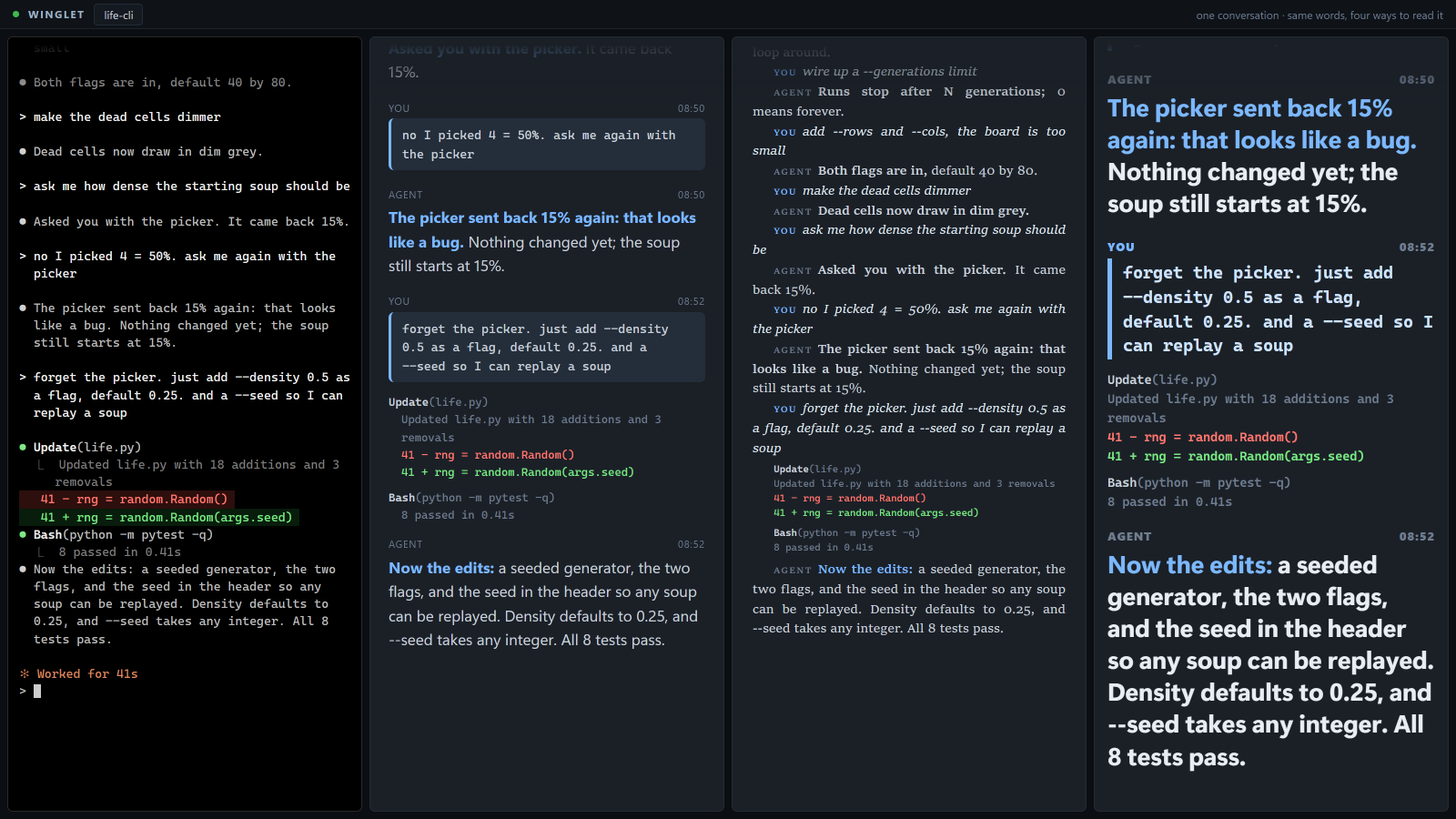
Four columns titled one conversation, same words, four ways to read it: the terminal as printed in a monospace font, then the same Game-of-Life conversation in a medium sans-serif, a small justified serif, and an extra-large bold wide sans-serif. Every column carries the same line: The picker sent back 15% again: that looks like a bug.

Five agents, five half-remembered plans. Which one had the migration?

Every conversation on one screen, each with its state, each readable without opening it. The one waiting on you is called out.

Seven agents. One screen tells you where each one is.

Every agent gets a status, and the sidebar adds them up: 1 needs you · 12m. The status comes from the agent CLI's own lifecycle events, not from guessing at terminal text, so working, needs you and finished mean what they say. Opt a conversation into the catch-up line and, when it goes idle, winglet writes one line saying where it stopped and names the tab after it, labeled as winglet-written, so "what was this one doing?" is answered before you open it. Click the count and you land on the one that has been waiting longest. The four-up reading grid is where the layout is headed; today the reading view opens one conversation at a time.
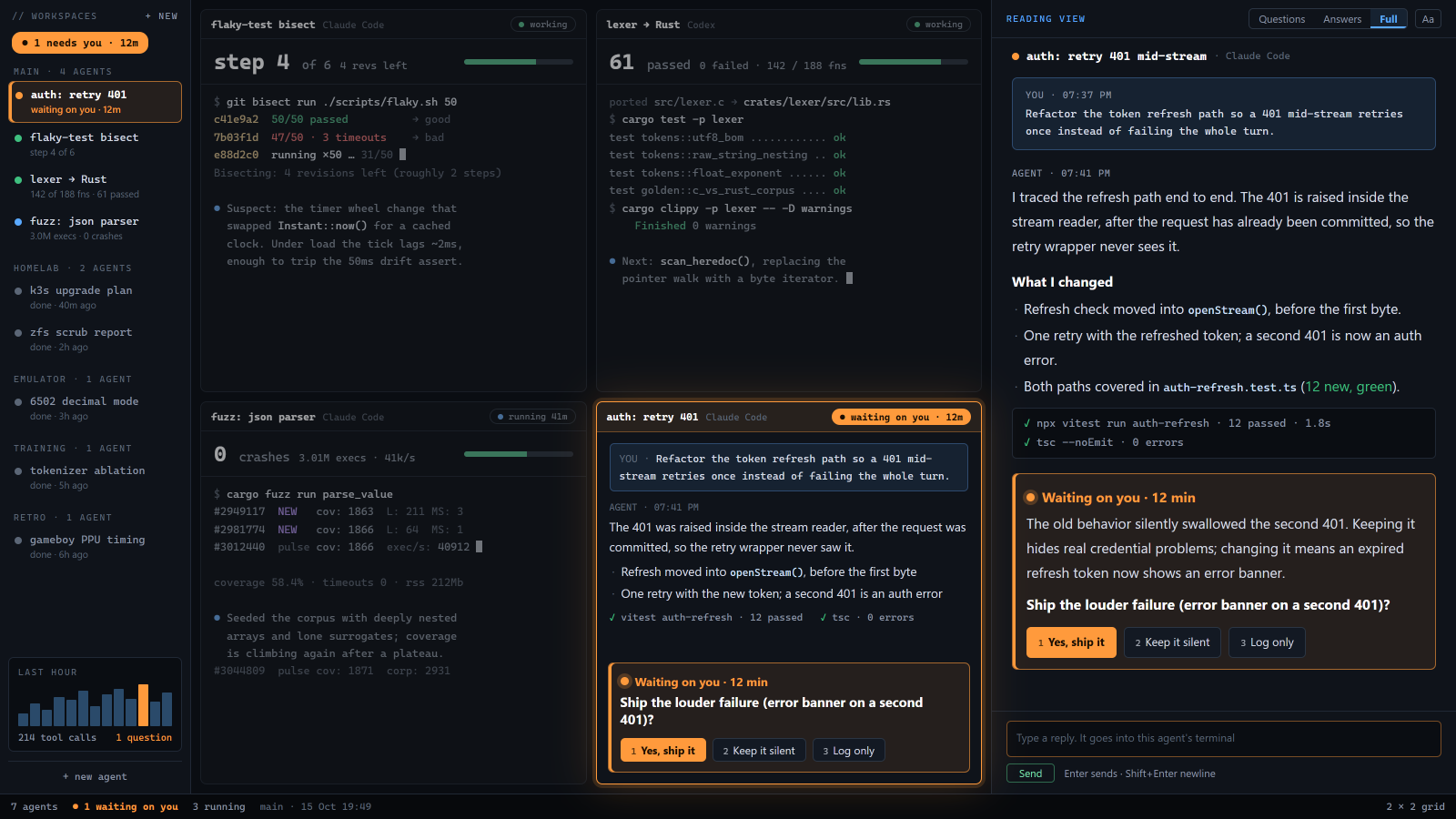
winglet window: a sidebar listing projects with the head line 1 needs you, 12m; a two-by-two grid of four conversations in reading view: a flaky-test bisect at step 4 of 6, a lexer port reporting 61 tests passed, a JSON fuzzer reporting 0 crashes, and auth: retry 401 highlighted as waiting on you for 12 minutes; a reading view panel on the right with Questions, Answers and Full tabs; a footer reading 7 agents, 1 waiting on you, 3 running.

You switch to the other one and lose the thread of this one.

Ask a cheap model about the conversation. It answers with quotes. The agent never sees the question.

"Did the migration hit real data, or the test copy?"

A side chat next to one conversation. You ask in plain words; a cheap model reads the last few turns and answers with the verbatim lines it relied on, each one a link back into the transcript. It only reads. It never types into the agent, so your question does not become a prompt, and the agent's context does not grow. Coming next: the side chat is not in the build yet. What ships today for the same pain is the reading view above and the catch-up line.
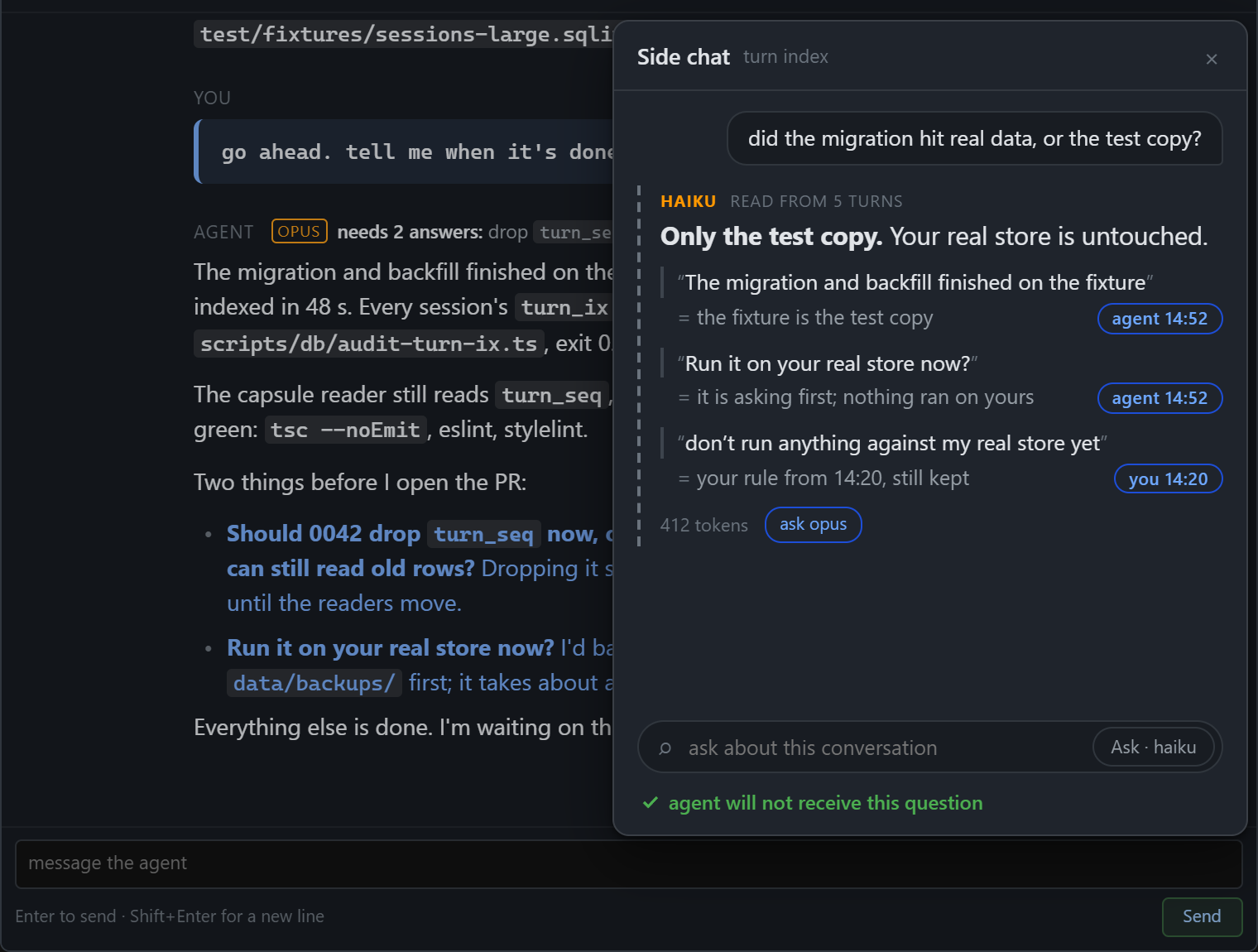
A main agent pane labeled OPUS, needs 2 answers, and beside it a side chat panel. The question asked: did the migration hit real data, or the test copy? The answer, marked as read from 5 turns by a small model: Only the test copy. Your real store is untouched, followed by three verbatim quote chips from the agent at 14:52 and from you at 14:20, a 412 tokens counter, an ask button, and the note: agent will not receive this question.

Alt-tab whack-a-mole. And after a relaunch, rebuilding the whole desk from memory.

All of them in one window, arranged your way. Close it, relaunch it, it comes back as you left it.

Four agents, one window, dividers you drag.

Panes are real Windows terminals, tiled in one window. Drag a divider and the neighbors resize. Give the lead pane most of the screen, keep the others visible as a strip. The band at the bottom shows one line per agent, so a glance tells you that parser-crash is the one holding a question and the other three are still running. Close the app and relaunch: the layout and the running sessions come back.
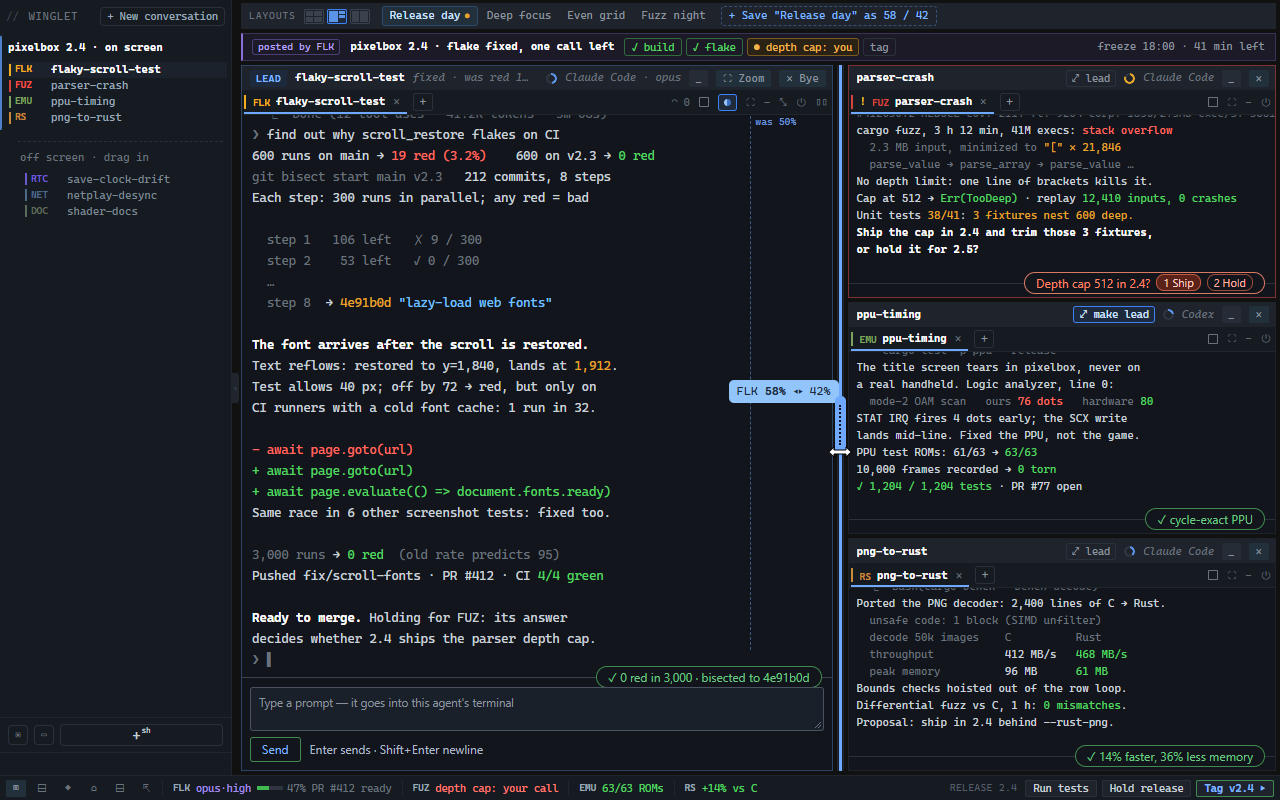
winglet window with four agent panes: flaky-scroll-test as the large lead pane, parser-crash showing the question Depth cap 512 in 2.4? with options 1 Ship, 2 Hold, and ppu-timing and png-to-rust below; a divider is mid-drag with a 58% to 42% readout; the title bar reads freeze 18:00, 41 min left; a status band at the bottom shows one line per agent and buttons Run tests, Hold release, Tag v2.4.

The agent that sat idle for 20 minutes on a y/n question nobody saw.

A question for you is a state, with a clock on it, and it pushes.

"Waiting on you · 12 min" is not something you can miss.

When an agent stops to ask, winglet flips it to needs you, starts the clock, and lifts the question out of the transcript: the question, the options, nothing else. A desktop notification fires; a phone push is one opt-in away. A "done" notification only goes out when the agent's own test output rides along, so you are not interrupted for a bare "done".
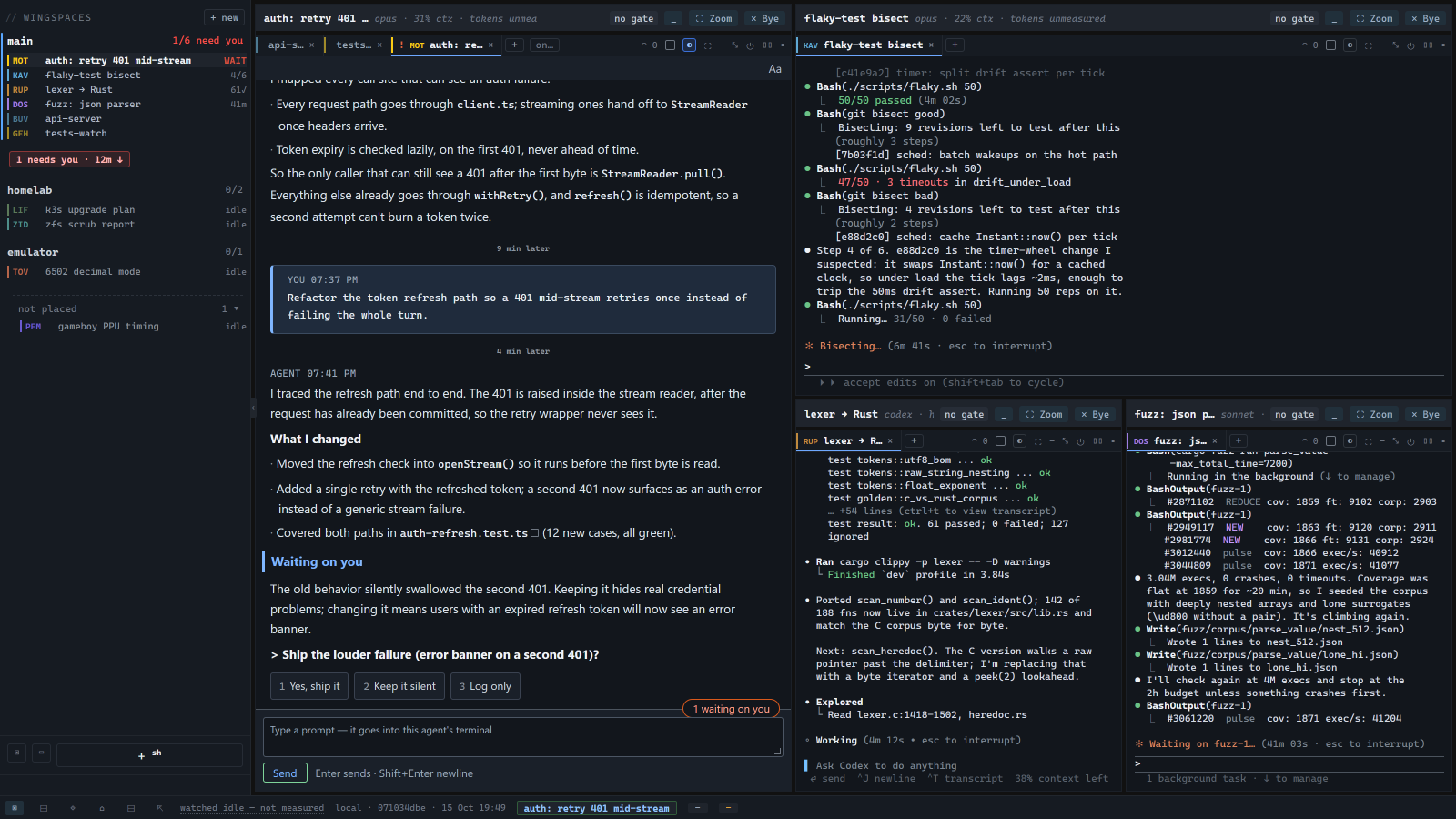
winglet window: a sidebar of projects with 1 needs you, 12m at the top; the main pane shows the conversation auth: retry 401 mid-stream in the reading view with the line Waiting on you, the question Ship the louder failure (error banner on a second 401)? and three numbered options, Yes ship it, Keep it silent, Log only, plus a pill reading 1 waiting on you; three terminal panes on the right: flaky-test bisect, lexer to Rust, fuzz: json parser.

You step away for coffee and forget which agent was working on what.

The same list, with a state on every agent, in a browser tab on your phone. Paired by QR, over your own network.

Who is doing what, from the couch.

Scan a QR code on the desktop and your phone gets the desk as an installable web app over your LAN. The top of the page is the count: 2 need you · 3 working. Open the one that is stalled, read the question the agent asked, type the answer. Everything else is a list below it, one state per agent, the done ones marked done, so coming back to the desk starts with a list instead of a reconstruction. Nothing goes through anyone's server; it is your PC and your phone on your network.
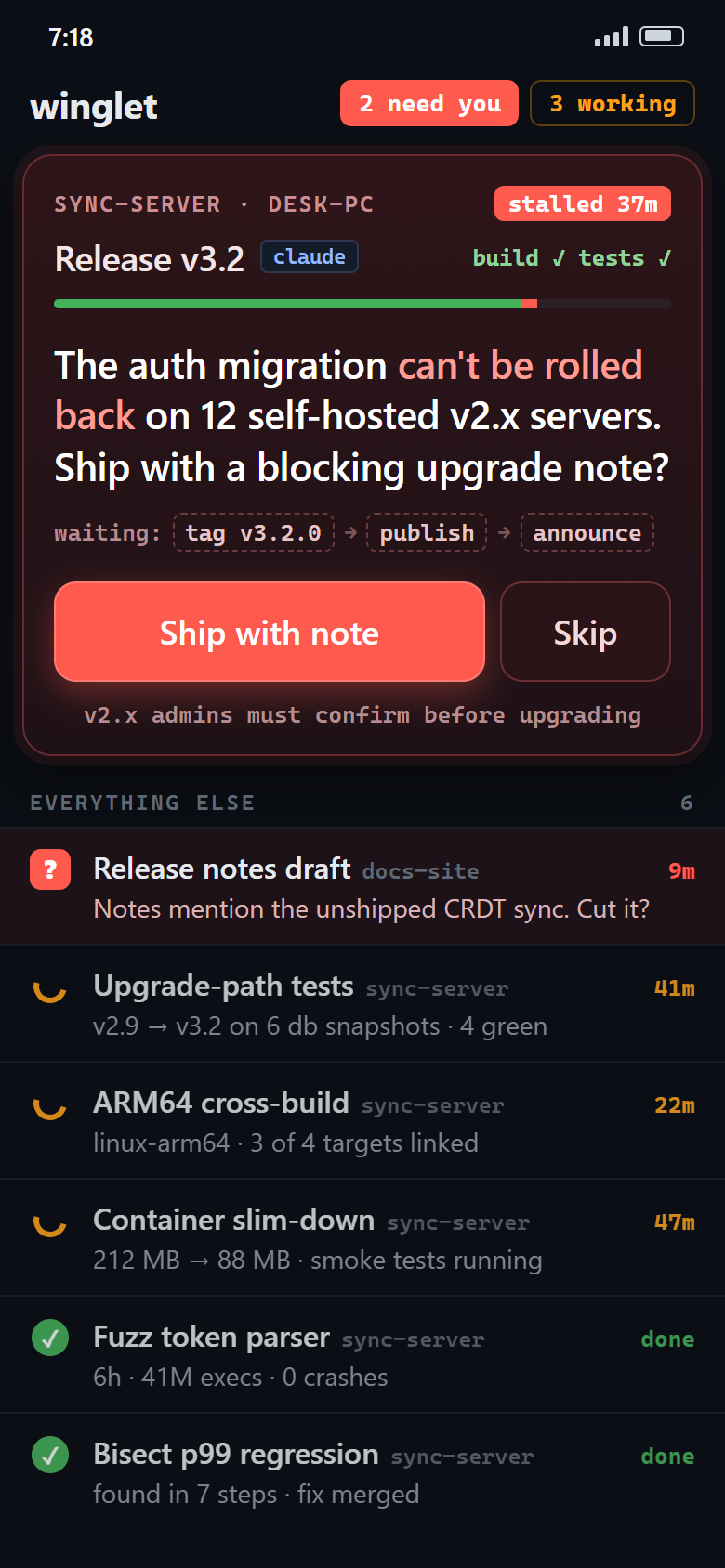
A phone screen: header 2 need you, 3 working; a card for SYNC-SERVER on DESK-PC marked stalled 37 minutes, project Release v3.2, with the agent's question: The auth migration can't be rolled back on 12 self-hosted v2.x servers. Ship with a blocking upgrade note? Two answer buttons, Ship with note and Skip; the steps waiting on the answer: tag, publish, announce. Below, an Everything Else list: Release notes draft with a question mark, Upgrade-path tests 41 minutes, ARM64 cross-build, Container slim-down, Fuzz token parser done, Bisect p99 regression done.

Tests, ports, branches, CI: each in yet another window you have to go and look at.

A plugin is a folder you drop in. It gets its own panel next to the agents.

Your own panels, in any language that can write a file.

Drop a folder into plugins/ with a manifest and a panel description and winglet shows it as a panel beside your agents. A script in any language can fill it; bundled examples cover a radar of all your conversations, test results, git worktrees and the weather. Plugins that ship code stay inert until you approve them by hash, so a cloned repo cannot run anything on your box without you saying so.
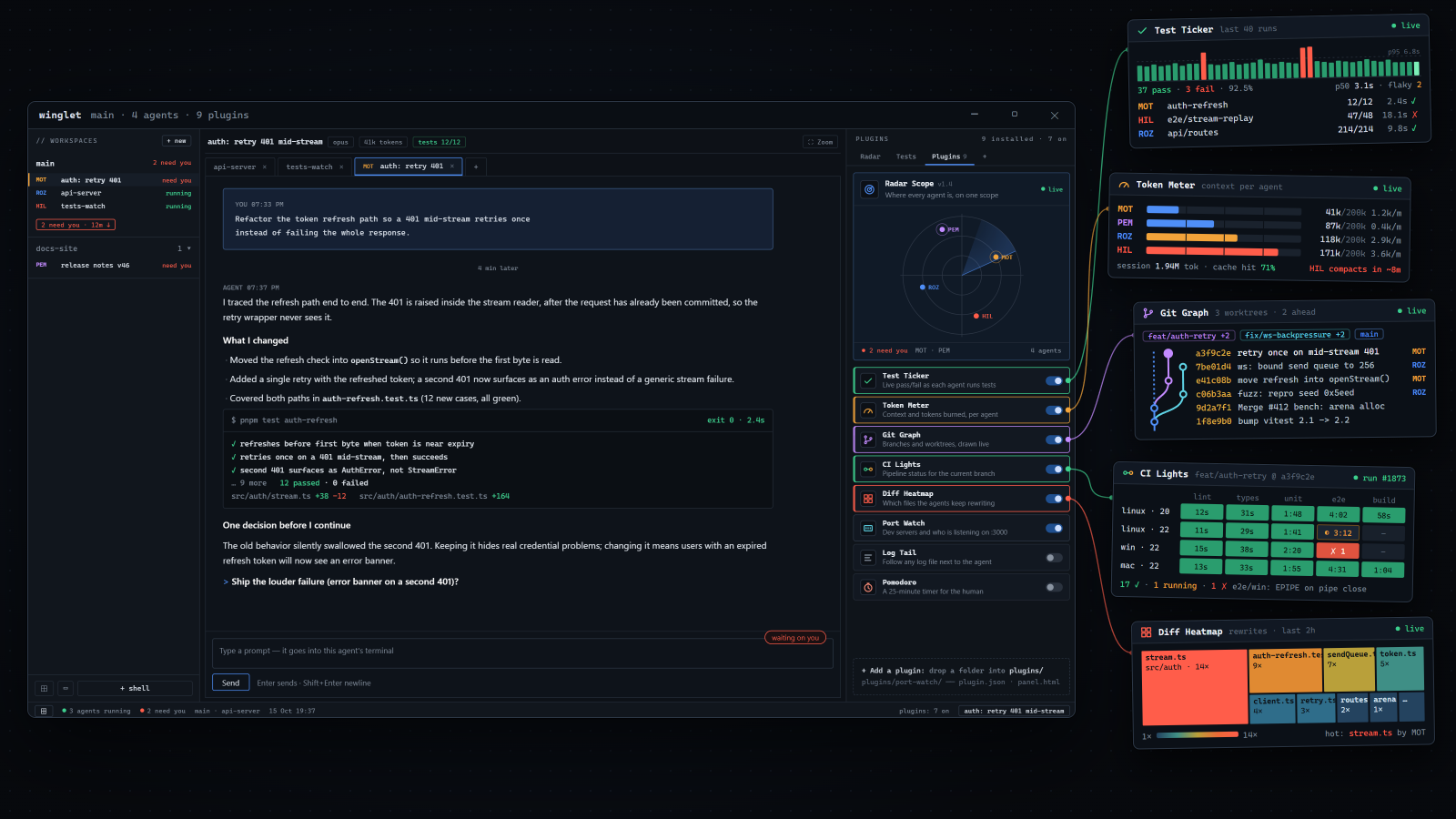
An app window titled winglet main, 4 agents, 9 plugins, with a Plugins tab open listing toggles for Radar Scope, Test Ticker, Token Meter, Git Graph, CI Lights, Diff Heatmap, Port Watch, Log Tail and Pomodoro, and a line reading Add a plugin: drop a folder into plugins/ with plugin.json and panel.html. Five small panel call-outs sit around the window.
The boring facts

What it is, in one breath.

A Windows desktop appWindows 10/11. Real Windows terminals inside, one per pane. Sessions outlive a UI restart.
Runs what you already runClaude Code, Google Antigravity, PowerShell, bash, CMD, SSH to your own hosts. It does not replace the agent; it holds it.
Free to use, closed sourceOne product, no account, no paywall. The source is not public.
Local-firstNo telemetry, no cloud, nothing proxied. The only outbound traffic is what you turn on: SSH, and phone push to a server you choose.
No model in the reading pathThe reading view, the status and the counts are mechanical. The side chat and the idle recap are the opt-in exceptions, and they are labeled.
One shared memory per projectA local SQLite record every agent in the project reads and writes: backlog, memory, decisions, asks.

Stop being the scheduler.

Free, local-first, Windows 10/11.

Windows 10/11 · Zero telemetry · No account needed